
Grok AI: Features, Uses, and How to Use It (2026)
Description
Grok AI helps people find answers, write content, create images, and learn new things. It works like a smart assistant and makes many daily tasks easier. For example, you can ask questions, search for information, or get help with a writing project.
Today, many people use AI tools to save time and improve their work. Grok makes this process simple because you can ask questions in normal language. It also connects with X (formerly Twitter), so you can explore public posts and current discussions.
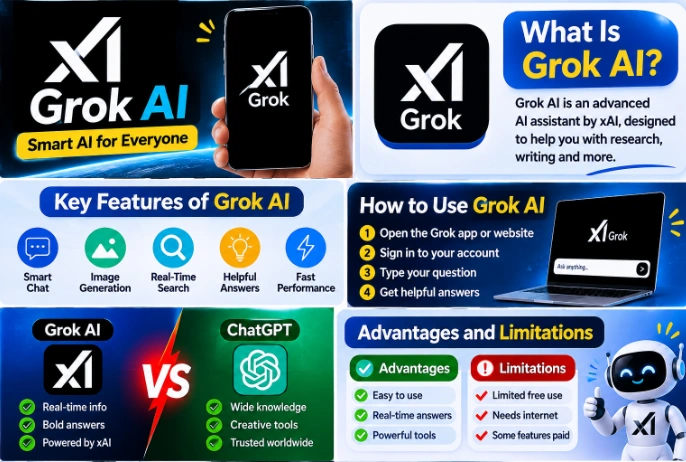
Moreover, Grok offers tools for image creation, video generation, voice chat, and coding. In this guide, we will explore its main features, uses, benefits, and limitations. We will also explain how beginners can start using Grok AI.
What Is Grok AI?
Grok AI is an artificial intelligence assistant that xAI developed. It helps users answer questions, write content, search for information, and solve different problems.
You can use Grok just like a chatbot. Simply type a question, and it will try to give you a useful answer. If you need more details, ask another question and continue the same conversation.
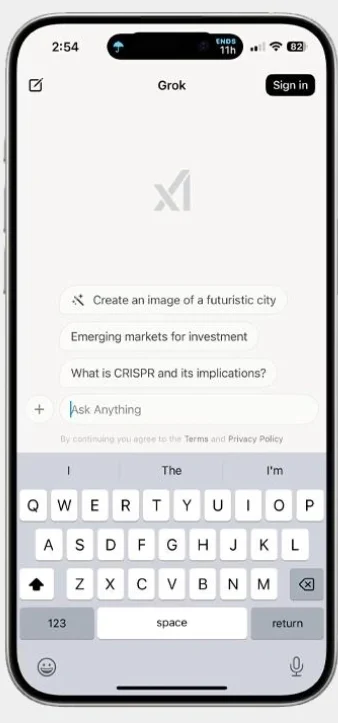
Grok also connects with X. Through this connection, it can explore public posts, online discussions, and trending topics. In addition, its other tools help users create images, explore videos, and understand files.
Because of these features, Grok can help students, writers, developers, and everyday users with different tasks. Meta Muse AI is a best Platform.
How Does Grok AI Work?
Grok uses advanced AI models to understand your questions and prepare answers. First, you enter a question or instruction. Then, Grok studies your words and creates a response.
For example, you can ask it to explain a difficult topic in simple English. It will try to break the topic into smaller and easier points.
You can also give it more details to improve the answer. Moreover, Grok can search online information when your question needs current details.
It can also understand supported files and images. However, it may sometimes provide incorrect answers. Therefore, check important facts before using them.
Key Features of Grok AI
Grok offers several tools that help users with writing, research, learning, and creative work. Let’s explore its main features.
AI Chat Assistant
Grok works as a smart chatbot. You can ask questions about education, technology, science, business, and many other topics.
It gives answers in a conversational style. Furthermore, you can ask follow-up questions to learn more about the same subject.
Real-Time Web Search
Grok can search the internet to find information about different topics. For example, you can ask about new technology, recent updates, or trending news.
It can also explore public discussions on X. As a result, users can learn what people are talking about online.
However, always check the original sources before trusting important information.
AI Image Generation
Grok offers an image creation tool called Grok Imagine. It allows you to create pictures by writing a simple description.
For example, you can type, “Create a beautiful mountain with green trees and a blue sky.” Grok will use your instructions to create an image.
You can also try different ideas and styles. Therefore, this feature can help with creative projects, blog images, and design ideas.
AI Video Generation
Grok Imagine also helps users create videos with AI. You can describe a scene and use the available tools to turn your idea into a short video.
For example, you can describe a moving car, a natural scene, or an animated character. Grok can then create a video based on your prompt.
This feature gives beginners an easy way to explore AI video creation. However, access and usage limits may depend on your account.
Voice Chat
Grok also supports voice conversations. Instead of typing, you can speak directly to the AI.
For example, you can ask a question while using your phone. Grok can respond through voice in supported versions.
This feature makes conversations easier, especially when you do not want to type long messages.
AI Writing Assistant
Grok can help you write different types of content. You can ask it to create article ideas, write short descriptions, or improve sentences.
Moreover, it can explain difficult words and rewrite paragraphs in simple English. It can also help you prepare outlines for your next blog post.
However, always review the final content before publishing it.
Coding Assistance
Grok can help people learn programming and understand code. You can ask questions about HTML, CSS, Python, and other coding languages.
For example, if you do not understand a piece of code, ask Grok to explain it step by step. It can also suggest changes and help you find common mistakes.
Therefore, beginners can use it to learn basic programming concepts.
File and PDF Analysis
Grok supports file uploads and can help users understand supported documents.
For example, upload a PDF and ask Grok to explain its main points. You can also ask it to find specific information or prepare a short summary.
As a result, you can understand long documents without reading every line yourself.
Image and Screenshot Understanding
Grok can also understand supported images and screenshots. You can upload a picture and ask questions about it.
For example, you can ask it to explain a chart, describe an object, or help you understand a diagram.
This feature helps users get information from pictures more easily.
Deep Research and Reasoning
Some topics need more than a short answer. For this reason, Grok offers research and reasoning features that help users explore difficult questions.
You can ask it to explain a subject in detail, compare different ideas, or organize information.
Moreover, these features can help when you want to learn about a topic before starting a project.
What Can You Do With Grok AI?
Grok can help with many tasks beyond simple questions. Here are some common ways to use it:
Learning
Ask Grok to explain difficult topics in easy words.
Writing
Create article ideas, titles, and short descriptions.
Research
Search for information about different subjects.
Coding
Learn programming and understand code.
Image Creation
Make pictures from written descriptions.
Video Creation
Explore short AI-generated videos.
Translation
Translate text into different languages.
File Reading
Find important details in supported documents.
Planning
Create simple plans and daily task lists.
Problem Solving
Get help with common questions and tasks.
With these features, Grok can support different types of users in their daily work.
How to Use Grok AI?
Grok has a simple chat interface, so beginners can start without much difficulty.
Follow these steps:
- Open a browser on your phone or computer.
- Visit the official Grok website.
- Check the account requirements.
- Sign in if the website asks you to do so.
- Open the chat screen.
- Type your question in the message box.
- Click the send button.
- Read the answer and ask more questions if needed.
After that, you can explore other available tools, such as image creation, video generation, and voice chat.
How to Get Better Answers From Grok AI?
Your instructions help Grok understand what you need. Therefore, write clear questions and explain your requirements.
Here are some simple tips:
- First, write a clear question.
- Next, explain what kind of answer you want.
- Also, mention your preferred language.
- Give examples when you need a specific result.
- Ask for simple explanations if a topic seems difficult.
- Use follow-up questions to get more details.
- Finally, check important information before using it.
For example, instead of writing Explain SEO, try this prompt:
Explain SEO in simple English and give me three easy examples.
This prompt gives Grok a clearer idea of your needs.
Grok AI Free vs Paid Plans
Grok offers free access with certain usage limits. However, users who need more access can explore its paid plans.
Here is a simple comparison:
| Features | Free Access | Paid Plans |
|---|---|---|
| AI Chat | Limited use | Higher limits |
| Web Search | Limited access | More access |
| Image Creation | Usage limits | Higher limits |
| Video Creation | May have limits | More access |
| Voice Chat | Depends on availability | More access |
| Advanced Features | Limited access | Additional access |
The company can change its plans, prices, and usage limits. So, visit the official website to check the latest details before choosing a plan.
Advantages of Grok AI
Grok offers several useful features that make daily tasks easier.
- It has a simple chat interface.
- It helps users write content.
- It can search for online information.
- It offers AI image creation.
- It supports video generation.
- It helps beginners understand coding.
- It offers voice conversations.
- It can read supported documents.
- It provides free access with limits.
Limitations of Grok AI
Although Grok offers many features, users should also understand its limitations.
- It can sometimes give incorrect answers.
- Free access comes with usage limits.
- Some features need a paid plan.
- Image results may not match your exact idea.
- Video creation may take time.
- Online information needs proper checking.
- Some features may not work in every location.
Therefore, use Grok as a helpful assistant and check important information yourself.
Grok AI vs ChatGPT vs Google Gemini
Grok, ChatGPT, and Google Gemini are popular AI assistants. All three help users answer questions and complete different tasks. However, each tool offers its own features.
| AI Tool | Main Uses |
|---|---|
| Grok AI | Web search, X discussions, writing, and image creation |
| ChatGPT | Writing, research, coding, and data analysis |
| Google Gemini | AI chat, research, and Google services |
For example, Grok can help you explore public discussions on X. Meanwhile, ChatGPT offers tools for writing and research. Google Gemini also connects with Google’s AI services.
So, choose a tool according to your needs instead of expecting one AI assistant to do everything perfectly.
Is Grok AI Worth Using?
Yes, Grok can be a useful option for people who want help with daily tasks. It offers tools for writing, research, learning, image creation, and more.
Moreover, its connection with X helps users explore public discussions and current topics. Beginners can also start with simple questions and learn how its features work.
However, Grok does not always provide correct answers. Some tools also have usage limits. Therefore, check important information and choose a plan according to your needs.
Overall, Grok is worth exploring if its features match your daily work.
Conclusion
Grok AI offers several useful tools for people who want help with writing, research, learning, and creative work. You can ask questions, search the web, create images, and explore different topics through one platform.
Moreover, its simple chat system makes it easy for beginners to get started. You can begin with basic questions and explore more features as you learn.
Yes, you can ask Grok to write articles, suggest titles, improve sentences, and create content ideas.
However, always check important answers because AI tools can make mistakes. Overall, Grok is a useful option for people who want to explore modern AI technology.
Frequently Asked Questions (FAQs)
Grok helps users answer questions, write content, search for information, create images, and understand different topics.
xAI developed Grok AI to help people with research, writing, learning, and other daily tasks.
Yes, Grok offers free access with some limits. Paid plans provide higher usage limits and additional features.
Yes, Grok can search the web and explore public posts on X to find information about different topics.
Yes, Grok Imagine allows users to create pictures by writing text descriptions.
Yes, Grok Imagine offers video creation features. However, access may depend on your account and plan.
Yes, you can ask Grok to write articles, suggest titles, improve sentences, and create content ideas.
Yes, Grok supports voice conversations in compatible versions. You can speak to it instead of typing.
Yes, Grok can help read and summarize supported PDF files. You can also ask questions about their content.
Yes, Grok offers an Android app. You can also visit its website through your mobile browser.
Yes, Grok can explain programming concepts, review code, and help users find common coding mistakes.
Yes, Grok can sometimes provide incorrect information. Therefore, check important facts before using its answers.
Download links
How to install Grok AI: Features, Uses, and How to Use It (2026) APK?
1. Tap the downloaded Grok AI: Features, Uses, and How to Use It (2026) APK file.
2. Touch install.
3. Follow the steps on the screen.